Meetings v4
With the Meetings API, you can create and manage meetings and their attendees within Concur Travel. It supports two primary use cases: meetings created natively within the SAP Concur platform using the Meetings Admin UI or Joule, and meetings created by external partners through API integration.
Find integration details in the Meetings Integration Guide.
Limitations
Access to this documentation does not provide access to the API.
Partner registration and scope approval are required. Please contact your SAP Concur representative for more information.
Process Flow
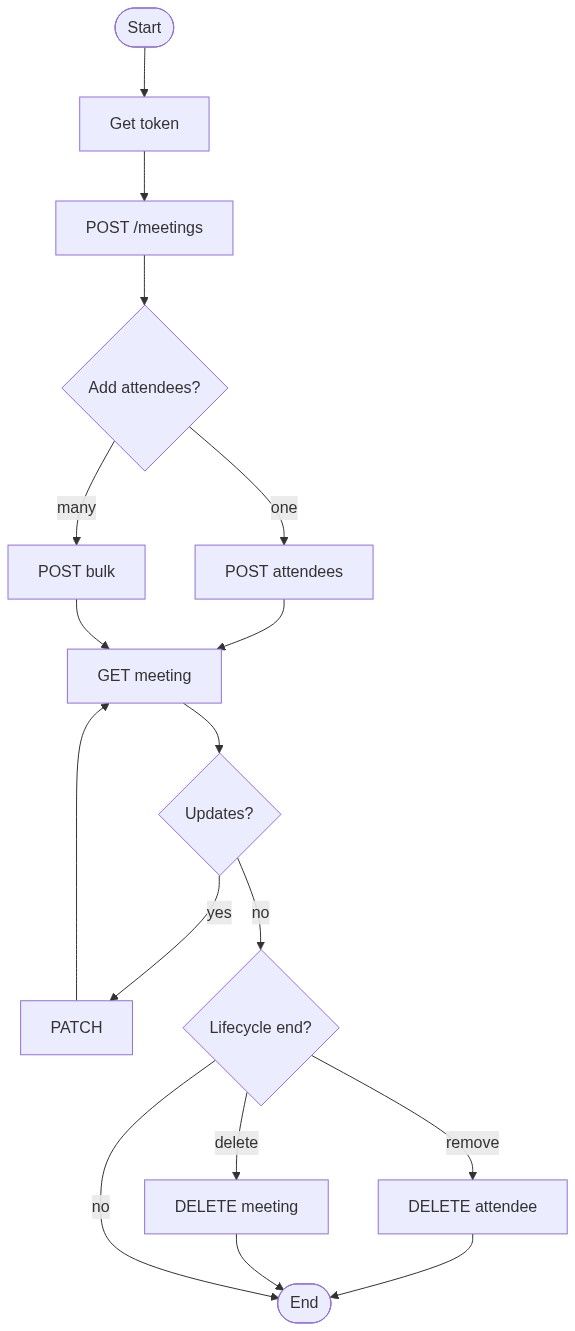
The most common partner flow is to obtain an access token, create a meeting, add attendees individually or in bulk, then read or update the meeting and attendees as needed. Removing attendees and deleting the meeting are optional end-of-lifecycle steps.
Products and Editions
- Concur Travel Professional Edition
- Concur Travel Standard Edition
Scope Usage
| Name | Description | Endpoint |
|---|---|---|
meetings.read |
Read meetings, attendees, and history | All GET endpoints |
meetings.write |
Create, update, and delete meetings, attendees, and login URLs | All POST, PATCH, and DELETE endpoints |
Dependencies
SAP Concur clients must purchase Concur Travel in order to use this API.
Partner applications must be registered on the App Center with the meetings.read and/or meetings.write scopes approved. Please contact your SAP Concur representative for more information.
Access Token Usage
All requests require an OAuth 2.0 bearer token in the Authorization: Bearer <token> header. The API accepts a User JWT or Company JWT; the company is resolved from the token’s company claim.
Meeting-scoped endpoints also accept an optional companyId query parameter. When omitted, the company is resolved from the token. When supplied, it must match the token’s company — a mismatch returns 403, and a malformed value returns 400.
Base URIs
- US Production:
https://us.api.concursolutions.com/meetings/v4 - EMEA Production:
https://emea.api.concursolutions.com/meetings/v4
Refer to Base URIs for details on selecting the correct instance URL.
Error Handling
Errors are returned using the standard SAP Concur error envelope. Handle errorCode programmatically; errorMessage is intended for logging.
{
  "errors": [
    { "errorCode": "ATTENDEE_NOT_FOUND", "errorMessage": "Attendee does not exist: <id>" }
  ]
}
See the Meetings v4 Endpoints page for the full list of operations, payloads, and schemas.