Document Compliance Gateway v4
The Document Compliance Gateway v4 API is designed to manage the transmission of compliance documents between the SAP Concur platform and validating vendors. Vendors can implement the API to exchange compliance documents with the SAP Concur system, validate those documents against relevant authoritative or regulatory sources, and return the validation results. Vendors can also read and parse the compliance document file to provide tax-related data for creating expense entries.
The API supports a streamlined and efficient process for compliance document validation. End users receive validation results prior to expense creation, helping to prevent unnecessary processing as well as the return and resubmission of expense reports. In addition, the API uses data extracted from the compliance document file to initiate the expense line item, reducing the need for manual data entry.
Prior Versions
No prior API version available
Limitations
Access to this documentation does not provide access to the API.
Process Flow
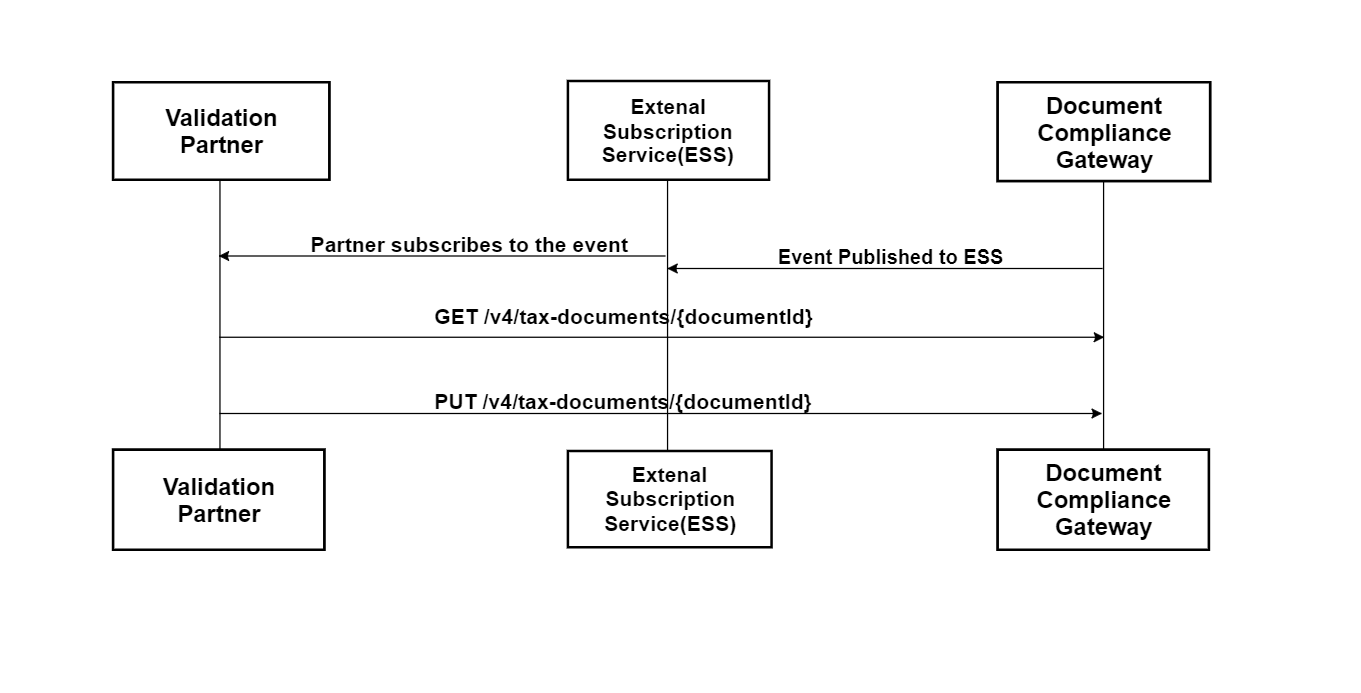
Products and Editions
- Concur Expense Professional Edition
Scope Usage
| Name | Description | Endpoint |
|---|---|---|
receipts.read |
Receipts - Tax Validation | GET |
receipts.write |
Receipts - Tax Validation | PUT |
Authentication
Authentication is provided through an App for company JWT. This API requires the valid access token with required scopes. Before making requests to the API, please obtain an access token from the Authentication API.
Dependencies
None.
Endpoints
GET API CALL
Get the compliance document
Scopes
Refer to Scope Usage for full details.
receipts.read
Request
URI
Template
GET https://{region}.api.concursolutions.com/document-compliance-gateway/v4/tax-documents/{documentId}
Parameters
| Name | Type | Format | Description |
|---|---|---|---|
documentId |
string |
- | Unique id assigned to a document. |
Headers
- Authorization is provided through an App for Business and the company JWT. More details can be found here
- concur-correlationid is used to track the workflow for every step.
Notes
- The company JWT is data center specific. The auth service (/token endpoint) that signs the JWT determines which data center the JWT will work in.
- To get a token or to refresh a token, use the curl command(s)specified here.
- Once you have the token use the following curl command to post invoice details:
curl --location --request GET 'https://integration.api.concursolutions.com/document-compliance-gateway/v4/tax-documents/{documentId}' -H 'Authorization: Bearer <JWT token>'
  -H 'concur-correlationid: {LogicalId}'
Response
Error Codes
| Code | Description |
|---|---|
| 400 | Validation errors in request body. |
| 401 | Unauthorized (invalid JWT or expired, etc.) |
| 404 | DCG Company Not Found |
| 410 | Resource Not Available (Document Deleted) |
| 500 | Internal Server Error |
| 503 | Service Unavailable |
| 502 | Bad Gateway |
Example
Request
GET https://us2.api.concursolutions.com/document-compliance-gateway/v4/tax-documents/c92565ca-78c7-47be-a730-1d33ef35cdac
Authorization: Bearer <JWT Token>
concur-correlationid: "Test-FlOW"
Response
HTTP/1.1 200 OK
Content-Type: XML
PUT API CALL
Provide the compliance document and/or validation result and parsed tax relevant data from the compliance document.
Scopes
Refer to Scope Usage for full details.
receipts.write
Request
URI
Template
PUT https://{region}.api.concursolutions.com/document-compliance-gateway/v4/tax-documents/{documentId}
Parameters
| Name | Type | Format | Description |
|---|---|---|---|
documentId |
string | Unique id assigned to a document. |
Headers
- Authorization is provided through an App for Business and the company JWT. More details can be found here
- concur-correlationid is used to track the workflow for every step.
Payload
-
digitalTaxDocument - A digitalTaxDocument file in JSON format that is required.
- displayedVersion - A multipart compliant document in human-readable PDF format.
- If the end user only uploads the XML file, the partner will receive the event with isDisplayVersionRequired = true.
- In such scenarios, If the xml file is valid and processed, the partner needs to convert the XML file into PDF format and upload it in the displayedVersion field mandatorily.
- If the XML file is invalid or has failed, uploading the displayedVersion is optional .
- If the end user only uploads the XML file, the partner will receive the event with isDisplayVersionRequired = true.
- complianceDocument - A multipart compliant e-document containing the structured e-invoice data.
- The partner will receive the event with isComplianceDocRequired = true.
- In such scenarios, if the partner is able to fetch the compliance document from the official authorities (status: processed), it must be provided in the complianceDocument field as a multipart attachment.
- If the partner is not able to fetch the compliance document from the official authorities (status: failed), uploading the complianceDocument is optional.
- The partner will receive the event with isComplianceDocRequired = true.
Notes
- The company JWT is data center specific. The auth service (/token endpoint) that signs the JWT determines which DC the JWT will work in.
- To get a token or to refresh a token, use the curl command(s)specified here. It is recommended to have a valid token and scope to make the post call to the API.
- Once you have the token, use the following curl command to post invoice details:
curl --location --request PUT 'https://integration.api.concursolutions.com/document-compliance-gateway/v4/tax-documents/{documentId}' -H 'Authorization: Bearer <JWT token>'
  -H "concur-correlationid": {LogicalId}\
  --form "digitalTaxDocument"=@"DigitalTaxToken.json"
Response
Error Codes
| Code | Description |
|---|---|
| 400 | Validation errors in request body. |
| 401 | Unauthorized (invalid JWT or expired, etc.) |
| 404 | DCG Company Not Found |
| 410 | Resource Not Available (Document Deleted) |
| 500 | Internal Server Error |
| 503 | Service Unavailable |
| 502 | Bad Gateway |
Example
Request
PUT https://us2.api.concursolutions.com/document-compliance-gateway/v4/tax-documents/c92565ca-78c7-47be-a730-1d33ef35cdac
Authorization: Bearer <JWT Token>
concur-correlationid: "Test-FlOW"
digitalTaxDocument:
{
   "Status":"processed",
   "DocumentData":{
      "FormatVersion":"4.0",
      "Code":"pos",
      "Number":"1234",
      "IssueDateTime":"2021-12-07T23:59:59",
      "UUID":"ED1752FE-E865-4FF2-BFE1-0F552E770DC9",
      "PaymentType":"Cash",
      "GrossAmount":0.0,
      "Discount":0.0,
      "Currency":"MXN",
      "ExchangeRate":"0.0",
      "NetAmount":0.0,
      "PaymentMethod":"PUE",
      "TotalWithholdingTax":0.0,
      "TotalSalesTax":0.0,
      "Vendor":{
         "CertificateNumber":"0000",
         "TaxNumber":"TXN-No-1000",
         "Name":"Vendor 1",
         "city":"Bellevue",
         "state":"WA",
         "country":"US",
         "phone":"888-867-5309",
         "addressLine":"123 Main St"
      },
      "Buyer":{
         "TaxNumber":"TXN-No-10001",
         "Name":"Buyer 1",
         "PostalCode":"MX-000001"
      },
      "LineItems":[
         {
            "ProductCode":"P1",
            "Description":"Description",
            "Amount":0.0
         }
      ],
      "DocumentPostalCode":"MX-000002"
   },
   "Description":"Document is valid",
   "Code":"200"
}
Response
HTTP/1.1 200 OK
Content-Type: application/json
{
  "DocumentId": "c92565ca-78c7-47be-a730-1d33ef35cdac",
  "Description": "Tokens have been received."
}
Schema
DigitalTaxDocument Schema
| Name | Type | Format | Description |
|---|---|---|---|
status |
string |
enum: [processed, failed] |
Required. Status of the compliance document. |
documentData |
object |
DocumentData Schema | Required. Document details and Tax Token info (Can be null for failed status). |
code |
string |
- | Response code provided by partner. |
description |
string |
- | Comment/description provided by partner. |
DocumentData Schema
| Name | Type | Format | Description |
|---|---|---|---|
issueDateTime |
string |
YYYY-MM-DDTHH:mm:ssZ | Required. Date and time when the document was created in the local timezone where it was issued. |
uuid |
string |
- | Required for countries: MX, PL. Document UUID - field present in compliance document/Government doc unique id. |
grossAmount |
number |
- | Required. Sum of amounts before discounts and taxes. |
currency |
string |
ISO 4217 | Required. Currency used to express amounts (According to the ISO 4217 codes). |
exchangeRate |
number |
- | Exchange Rate according to currency used. |
netAmount |
number |
- | Required. Gross Amount – Discounts + VAT Taxes – Withholding Taxes. |
paymentMethod |
string |
- | Specify the code of payment method - PUE - only one payment, PPD - payment done in partial payments, PIP - Initial payment and partialities. |
vendor |
object |
Vendor schema | Required. Details of the vendor. |
number |
string |
- | Required for countries: FR, PL. Number/Supplier Document Id of the receipt. |
formatVersion |
string |
enum: [3.3, 4.0] |
Version of the compliance document. |
buyer |
object |
Buyer schema | Details of the buyer. |
code |
string |
- | Prefix of receipt, an alphanumeric field that can refer to a physical place (POS, branch, factory, warehouse, office, etc.) or any other criteria (like business, line of product, etc.) |
documentPostalCode |
string |
- | Postal code of place of receipt issue. |
paymentType |
string |
enum: [Cash, Credit Card, Digital Wallet] |
Means of payment. |
discount |
number |
- | Total amount of applicable discounts before taxes. |
totalSalesTax |
number |
- | Sum of all sales tax amounts of line items. |
totalWithholdingTax |
number |
- | Sum of all withhold tax amounts of line items. |
lineItems |
array |
LineItem schema | Line items present in the compliance document. |
verificationCode |
string |
- | Company’s certificate used to generate digital signature. |
comments |
string |
- | Comment/description. |
Vendor Schema
| Name | Type | Format | Description |
|---|---|---|---|
name |
string |
- | Required. Name of receipt issuer. |
country |
string |
- | Country of receipt issuer. |
taxNumber |
string |
- | Required for countries: PL, FR. Taxpayer ID of the vendor. |
certificateNumber |
string |
- | Company’s certificate used to generate digital signature. |
city |
string |
- | City of receipt issuer. |
state |
string |
- | State of receipt issuer. |
phone |
string |
- | Phone number of receipt issuer. |
addressLine |
string |
- | AddressLine of receipt issuer. |
Buyer Schema
| Name | Type | Format | Description |
|---|---|---|---|
taxNumber |
string |
- | Required. Buyer Tax Number. |
name |
string |
- | Buyer Name. |
PostalCode |
string |
- | Postal code of tax domicile of recipient. |
LineItem Schema
| Name | Type | Format | Description |
|---|---|---|---|
amount |
number |
- | Required. Total amount of goods or service. |
description |
string |
- | Required. Product Description. |
productCode |
string |
- | Key of product or service covered - 10101502 (Dogs), 10101506 (Horses) (Catalogue: c_ClaveProdServ) |