Poland e-Invoicing Solution: Implementation Approach for Customers and Partners
Overview
This document presents a high-level overview of the proposed solution and implementation approach required by customers and partners to enable e-invoicing for Poland within Concur Expense.
The document provides the technical approach for external partners to implement the PULL-based approach.
Solution Approach (Pull Model)
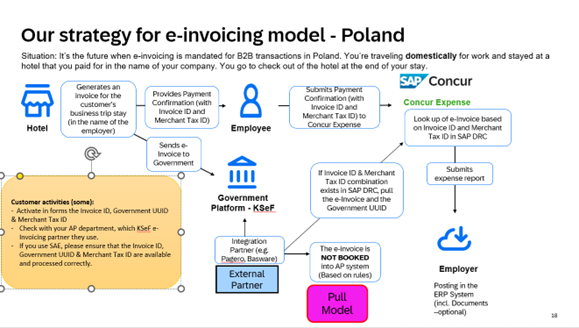
Solution from Concur
The following enhancements outline the proposed system behaviour to support Poland e-invoicing within Concur Expense.
1. Introduction of Standard Fields
Concur will introduce standard fields to capture:
- Merchant Tax ID
- Invoice ID
- Government Invoice ID (KSeF ID)
2. Field Availability and Data Entry
These fields will be available at the expense entry level.
- Merchant Tax ID and Invoice ID will be editable fields, allowing employees to manually input the relevant values.
- Government Invoice ID (KSeF ID) will be a read-only field.
Note: Additional configuration is required within Concur Expense to enable the Invoice ID and Government Invoice ID (KSeF ID) on the entry forms. See Concur Expense Configuration below.
3. Trigger for External Partner Integration
When both the Merchant Tax ID and Invoice ID are provided by the employee, Concur will trigger an external event to notify subscribed partners.
This event indicates to the partner that the employee has triggered an expense creation and the relevant e-invoice is to be retrieved.
The event-based mechanism provides a near real-time experience to the employee. The expense report remains in processing status while the partner responds to the event by calling the API with the e-invoice document.
4. Inbound Data from Partner
Concur will provide an API to accept the e-invoice (KSeF XML invoice) and the associated KSeF ID from the connected partner system.
The API will also accept other tokens such as amount and date, as read from the XML invoice by the partner.
5. Expense and Invoice Linking
The retrieved e-invoice document will be automatically linked to the corresponding expense item created by the employee.
The Government Invoice ID (KSeF ID) will be displayed on the expense item as read-only information.
Partner Implementation
1. Event Subscription
The partner must subscribe to the external event and provide a designated endpoint to receive event notifications from Concur.
2. Invoice Retrieval and Submission
Upon receiving the event, the partner is responsible for identifying the corresponding e-invoice using the Merchant Tax ID and Invoice ID provided in the event payload.
The partner will then transmit the e-invoice to Concur through the provided API.
Additionally, the partner must extract the necessary data elements (tokens) from the XML invoice, including the Government Invoice ID (KSeF ID), and include these values in the API request to populate the relevant expense item.
If the partner cannot find the corresponding e-invoice, it should provide the relevant error message to Concur.
The expectation is to receive a response from partners in real time upon raising the events. The SLA can be discussed.
Technical Steps for Partner Integration
1. Generate AppID (Client ID)
Clients who have Client Web Services can generate Client IDs (App IDs) and Client Secrets as described in: OAuth 2.0 Application Management Tool
Specify the following scopes when creating a new app:
Required Scopes:
events.topic.read,receipts.read,receipts.write
This provides a ClientID and clientSecret.
This activity can be performed by the Concur customer admin and does not require action from the integration partner.
2. Authentication: Generate Company Request Token
A Company Request Token is required to request an Access/Refresh Token (JSON web token or JWT) for connecting to APIs in the SAP Concur platform.
Company Request Token Self-Service Tool
This activity can be performed by the Concur customer admin and does not require action from the integration partner.
3. Event Subscription
This activity must be performed by the integration partner.
The partner must subscribe to the event with an endpoint to receive event notifications. Steps to subscribe to events are detailed here: Event Subscription Service v4
The details of the specific event are described here: Document Tax Compliance Event
Steps to be performed by the integration partner for event subscription:
a. Obtain an access token using the client_credentials grant
POST /oauth2/v0/token HTTP/1.1
Host: us2.api.concursolutions.com
Content-Type: application/x-www-form-urlencoded

client_id={your-app-client-id}
&client_secret={your-app-client-secret}
&grant_type=client_credentials
This generates an access token.
b. Create a subscription to a topic with a webhook app endpoint
PUT /v4/subscriptions/webhook HTTP/1.1
Host: www-us2.api.concursolutions.com
Authorization: Bearer {access_token}
Content-Type: application/json

{
  "id": "<unique subscription id for customer>",
  "filter": "PL.compliance",
  "topic": "public.concur.document.tax.compliance",
  "webHookConfig": {
    "endpoint": "<webhook endpoint for event processing>"
  }
}
c. Call Concur Auth API
POST /oauth2/v0/token HTTP/1.1
Content-Type: application/x-www-form-urlencoded
Host: us.api.concursolutions.com

client_id=<your-client_id>
&client_secret=<your-client_secret>
&grant_type=password
&username=<companyId>
&password=<company request token>
&credtype=authtoken
The partner will be able to receive events after completing these steps.
Example Event for Poland
{
  "correlationId": "polandteststandard",
  "eventType": "PL.compliance",
  "topic": "public.concur.document.tax.compliance",
  "subtopic": null,
  "timeStamp": "2026-01-06T17:16:22.235Z",
  "data": null,
  "facts": {
    "companyId": "8e093375-2319-435e-95d1-9482d17b3d65",
    "isDisplayVersionRequired": false,
    "isComplianceDocRequired": true,
    "taxId": "MerchantTaxStandard",
    "complianceCountryCode": "PL",
    "documentId": "d91c624a-d152-45e3-8331-5b611e97c1eb",
    "invoiceId": "InvoiceStandard",
    "href": "https://us2.api.concursolutions.com/document-compliance-gateway/v4/taxdocuments/d91c624a-d152-45e3-8331-5b611e97c1eb"
  },
  "id": "63f5b366-63d5-4343-8f15-ed7246da9b67"
}
For Poland, the complianceCountryCode is PL. The event is enhanced to include Merchant Tax ID (taxId) and Invoice ID (invoiceId).
4. Implement Document Compliance Gateway API to Accept XML Document and Token Data
API Details: Document Compliance Gateway v4
The API accepts an XML document in addition to tokenized data. The e-invoice retrieved from the KSeF portal should be sent as an XML document.
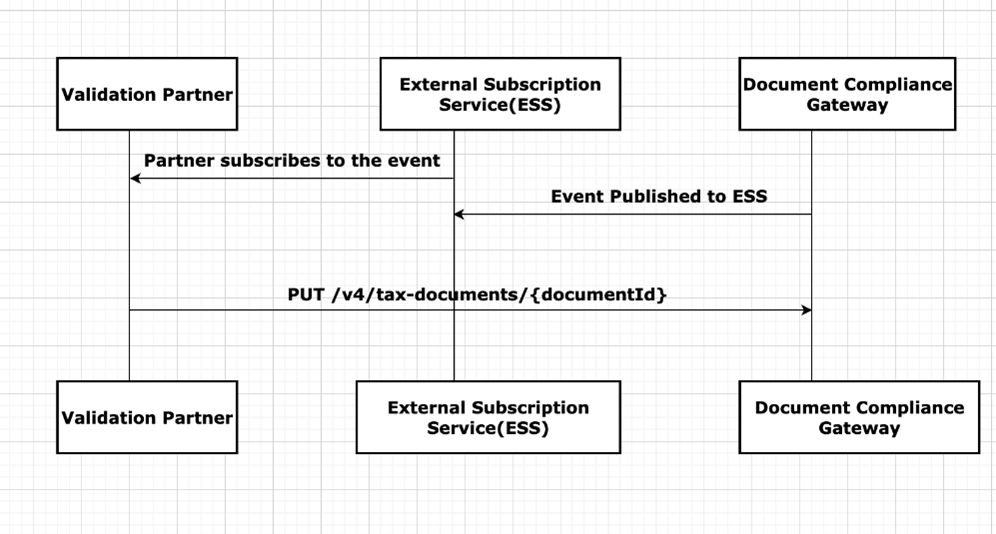
Example
PUT API Call
Scopes: receipts.write
Request:
PUT https://{region}.api.concursolutions.com/document-compliance-gateway/v4/tax-documents/{documentId}
Parameters
| Name | Type | Format | Description |
|---|---|---|---|
| documentId | string | Unique ID assigned to a document. |
Headers
Authorization— provided through an App for Business and the company JWT.concur-correlationid— used to track the workflow for every step.
Payload
-
digitalTaxDocument— AdigitalTaxDocumentfile in JSON format. Required. displayedVersion— A multipart compliant document in human-readable PDF format.- If the end user only uploads the XML file, the partner will receive the event with
isDisplayVersionRequired = true.- If the XML file is valid and processed, the partner must convert the XML file to PDF and upload it in the
displayedVersionfield. - If the XML file is invalid or has failed, uploading
displayedVersionis optional.
- If the XML file is valid and processed, the partner must convert the XML file to PDF and upload it in the
- If the end user only uploads the XML file, the partner will receive the event with
complianceDocument— A multipart compliant e-document containing the structured e-invoice data.- The partner will receive the event with
isComplianceDocRequired = true.- If the partner can fetch the compliance document from the official authorities (status: processed), it must be provided in the
complianceDocumentfield as a multipart attachment. - If the partner cannot fetch the compliance document from the official authorities (status: failed), uploading
complianceDocumentis optional.
- If the partner can fetch the compliance document from the official authorities (status: processed), it must be provided in the
- The partner will receive the event with
Once you have the token, use the following curl command to post invoice details:
curl --location --request PUT 'https://integration.api.concursolutions.com/document-compliance-gateway/v4/tax-documents/{documentId}' \
  -H 'Authorization: Bearer <JWT token>' \
  -H "concur-correlationid: {LogicalId}" \
  --form "digitalTaxDocument"=@"DigitalTaxToken.json" \
  --form complianceDocument=@"PL-CompliantDoc.xml"
Response Example
Request
PUT https://us2.api.concursolutions.com/document-compliance-gateway/v4/tax-documents/d91c624a-d152-45e3-8331-5b611e97c1eb
Authorization: Bearer <JWT Token>
concur-correlationid: "polandteststandard"
digitalTaxDocument:
{
  "Status": "processed",
  "Description": "PL Validation",
  "DocumentData": {
    "FormatVersion": "4.0",
    "Code": "AQ",
    "Number": "InvoiceStandard",
    "IssueDateTime": "2022-10-19T07:24:53",
    "GrossAmount": 517.24,
    "Discount": null,
    "Currency": "PLN",
    "NetAmount": 600,
    "PaymentMethod": "PUE",
    "DocumentPostalCode": "12345",
    "Vendor": {
      "CertificateNumber": "00001000000508021176",
      "TaxNumber": "MerchantTaxStandard",
      "Name": "Poland Vendor Name"
    },
    "Buyer": {
      "TaxNumber": "Buyer1234",
      "Name": "SAP Poland Buyer",
      "PostalCode": "12345"
    },
    "TotalSalesTax": 82.76,
    "TotalWithholdingTax": null,
    "UUID": "123456789-ABCD9876-CA63CA-F92EEF-RC",
    "PaymentType": "Cash",
    "LineItems": [
      {
        "ProductCode": "90101500",
        "Quantity": 1,
        "UnitOfMeasure": "E48",
        "Description": "Water Mineral",
        "UnitPrice": 60.34,
        "Amount": 60.34,
        "Discount": null
      },
      {
        "ProductCode": "90101500",
        "Quantity": 1,
        "UnitOfMeasure": "E48",
        "Description": "Product Description",
        "UnitPrice": 189.66,
        "Amount": 189.66,
        "Discount": null
      }
    ]
  }
}
Response
HTTP/1.1 200 OK
Content-Type: application/json

{
  "DocumentId": "d91c624a-d152-45e3-8331-5b611e97c1eb",
  "Description": "Tokens have been received."
}
Schema
DigitalTaxDocument Schema
| Name | Type | Format | Description |
|---|---|---|---|
| status | string | "enum": ["processed", "failed"] |
Required — Status of the compliance document. |
| documentData | object | DocumentData Schema | Required — Document details and Tax Token info (can be null for failed status). |
| code | string | optional | Response code provided by partner. |
| description | string | optional | Comment/description provided by partner. |
DocumentData Schema
| Name | Type | Format | Description |
|---|---|---|---|
| issueDateTime | string | YYYY-MM-DDTHH:mm:ssZ |
Required — Date and time when the document was created in the local timezone where it was issued. |
| uuid | string | - | Required — Document UUID — field present in compliance document / Government doc unique ID. |
| grossAmount | number | - | Required — Sum of amounts before discounts and taxes. |
| currency | string | "enum": ["INR","MXN","USD",..] |
Required — Currency used to express amounts (ISO 4217 codes). |
| exchangeRate | string | - | Required — Exchange rate according to currency used. |
| netAmount | number | - | Required — Gross Amount – Discounts + VAT Taxes – Withholding Taxes. |
| paymentMethod | string | - | Required — Payment method code: PUE (single payment), PPD (partial payments), PIP (initial payment and partialities). |
| vendor | object | Vendor schema | Required — Details of the vendor. |
| formatVersion | string | "enum": ["4.0",..] |
Version of the compliance document. |
| buyer | object | Buyer schema | Details of the buyer. |
| number | string | - | Number/Supplier Document ID of the receipt. |
| code | string | - | Prefix of receipt — alphanumeric field referring to a physical place (POS, branch, factory, warehouse, office) or another criteria. |
| documentPostalCode | string | - | Postal code of place of receipt issue. |
| paymentType | string | "enum": ["01", "02", "03"] |
Means of payment: 01 (Cash), 02 (Cheque), 03 (Bank Transfer/Digital Wallet). |
| discount | number | - | Total amount of applicable discounts before taxes. |
| totalSalesTax | number | - | Sum of all sales tax amounts of line items. |
| totalWithholdingTax | number | - | Sum of all withholding tax amounts of line items. |
| lineItems | array | LineItem schema | Line items present in the compliance document. |
| verificationCode | string | - | Company’s certificate used to generate digital signature. |
| comments | string | - | Comment/description. |
Vendor Schema
| Name | Type | Format | Description |
|---|---|---|---|
| taxNumber | string | - | Required — Taxpayer ID of the vendor. |
| certificateNumber | string | - | Company’s certificate used to generate digital signature. |
| name | string | - | Name of receipt issuer. |
| city | string | - | City of receipt issuer. |
| state | string | - | State of receipt issuer. |
| country | string | - | Country of receipt issuer. |
| phone | string | - | Phone number of receipt issuer. |
| addressLine | string | - | Address line of receipt issuer. |
Buyer Schema
| Name | Type | Format | Description |
|---|---|---|---|
| taxNumber | string | - | Required — Buyer Tax Number. |
| postalCode | string | - | Postal code of tax domicile of recipient. |
| name | string | - | Buyer Name. |
LineItem Schema
| Name | Type | Format | Description |
|---|---|---|---|
| amount | number | - | Required — Total amount of goods or service. |
| description | string | - | Product description. |
| productCode | string | - | Required — Key of product or service (catalogue: c_ClaveProdServ). |
Concur Expense Configuration
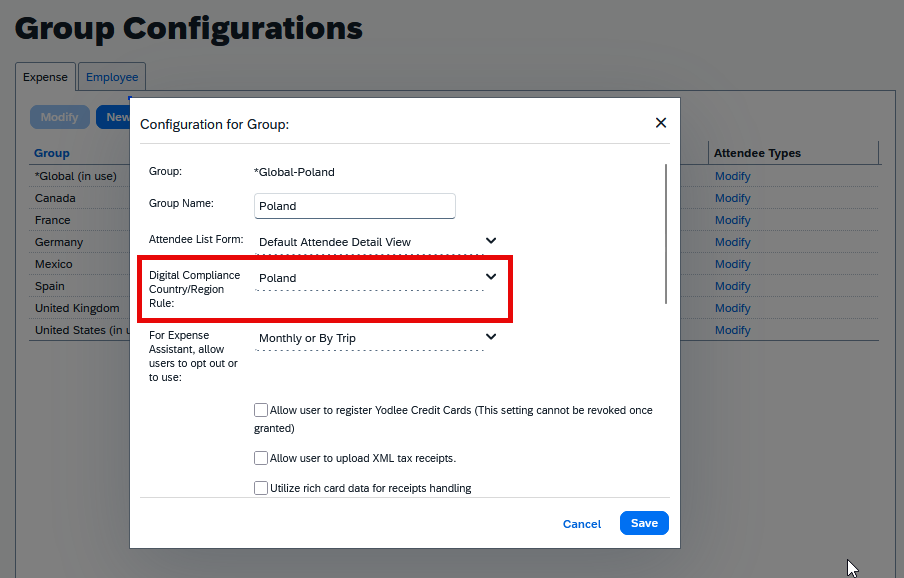
- Navigate to Administration > Expense > Group Configurations.
- Select the Expense Group Configuration applicable to Poland and click Modify.
- Under Digital Compliance Country/Region Rule, click the drop-down and select Poland.
- Click Save.
Disclaimer
This document is provided for customers and partners to plan the implementation to support the e-invoicing regulation for Poland within Concur Expense. The document should not be considered a final solution.